

Your SSS ID number is a unique identification number assigned to you by the Philippine Social Security System (SSS). It is a 10-digit number that serves as your lifetime identification number for all transactions with the SSS. Your SSS ID number is necessary when you apply for SSS benefits, loans, and other services.
You use the SSS ID number to track your contributions, loans, and other transactions with the SSS. It also helps verify your identity during transactions with the SSS. Having an SSS ID number is important because it ensures the proper crediting of your contributions to your account and confirms your eligibility for SSS benefits.
Your SSS ID number is unique to you and cannot be used by anyone else. It is important to keep your SSS ID number confidential and secure. Do not share your SSS ID number with anyone, except for authorized SSS personnel or institutions that require it for legitimate purposes.
Eligibility For Applying For an SSS ID Number
Age Requirement
You must be of legal working age to apply.
Employment Status Criteria
Both employed and self-employed individuals can apply, provided they contribute to the system.
Citizenship Requirements
Citizens and, in some cases, residents are eligible.
How To Apply For SSS ID Number?
To get an SSS number, you have a few options. You can visit any SSS branch with a valid ID and, if employed, proof of your job. Fill out the SSS Form E-1. You can also visit the SSS website to download the form, complete it, and then submit it at a branch.
The easiest way is to apply online through the My.SSS portal on the SSS website. Just create an account, follow the steps to apply for an SSS number, and upload any needed documents. These methods ensure you’re set up to enjoy SSS benefits.
Steps To Apply For an SSS ID Number Using SSS Branch
Gather Required Documents (SSS Id Number Requirements)
- Valid ID: Any government-issued ID, such as a passport or driver’s license, that proves your identity.
- Proof of employment or contribution: This could be your latest payslip or a receipt of your SSS contribution payment.
- Application form: The SSS E-6 form, available for download from the SSS website or at any branch.
Visit the Nearest SSS Branch
- Locate the nearest SSS branch: Use the SSS website’s branch locator tool.
- Set an appointment: Some branches might require you to book an appointment online through the SSS website to ensure social distancing and manage visitor volume.
Submit the Application
- Fill out the application form: Provide accurate and complete information on the E-6 form.
- Present the required documents: Hand over your ID and proof of contribution to the SSS officer.
- Pay the necessary fees: If there are fees involved, usually for the ID card processing, make the payment.
Biometric Data Capture
- Have your photo taken: This photo will appear on your SSS ID.
- Provide your fingerprints: For verification and added security.
Waiting Period
- Verification of application: The SSS will review your submitted details for accuracy.
- Processing of the SSS ID number: After verification, they will process and assign your unique SSS ID number.
- Delivery of the SSS ID card: The physical ID card, equipped with your photo and a barcode, will be mailed to your registered address.
Steps To Apply SSS ID Number Online Registration
To register online, visit the SSS website and click on the “NO SS NUMBER YET? APPLY ONLINE!” icon.

After clicking “apply online” You will see the following page that will show you the steps as bellow.
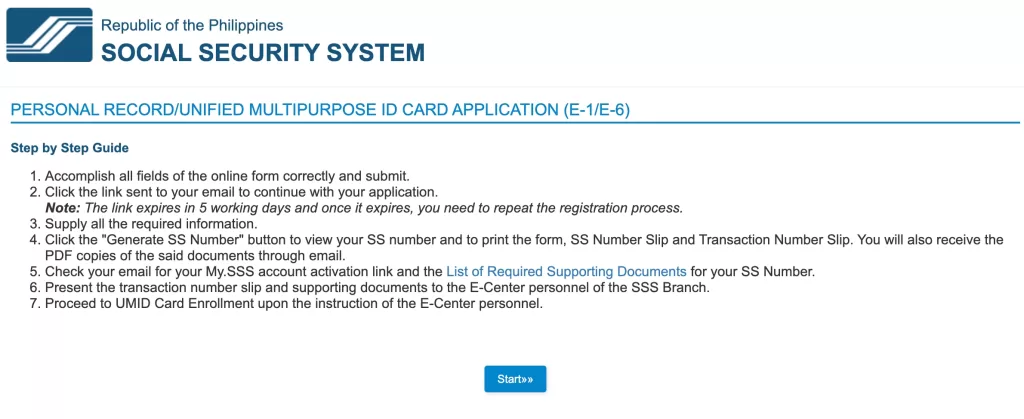
Then click the Stat>> button and you will be redirected to the “Registrant Record Verification” page.

Fill your details on the records form and submit it. After submitting it you will receive an mail to your provided email with the sss application form link as bellow.
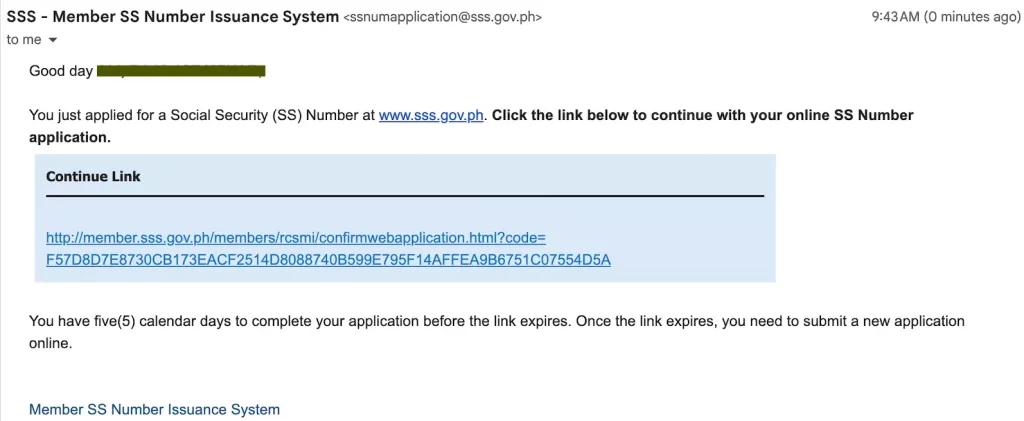
Click on the link it will open the application form as below.

Fill out the SSS ID Number application form online completely and correctly, and submit it. While filling the application form follow the steps below.
Complete Additional Information
You might need to fill in more details or confirm the information you’ve already provided.
Upload Required Documents
If asked, upload any necessary documents. These could include a scanned copy of your valid ID and, for employed individuals, proof of employment.
Review and Confirm
Double-check all the information you’ve entered and the documents you’ve uploaded. Make sure everything is accurate and complete.
Submit Final Application
Once you’re sure everything is in order, submit your application for final processing.
Receive Your SS Number
After submitting, you will receive your SS Number. This might be instantly displayed on the screen or sent to you via email.
Registration Confirmation
You may also receive a confirmation email or message from SSS confirming that your application is complete and providing you with your official SS Number.
Follow Next Steps
The confirmation message or email will likely include next steps, such as how to get your SSS ID card or how to start making contributions.
Remember, the online process is designed to be convenient, allowing you to apply from anywhere at any time. If you encounter any issues or have questions, you can contact the SSS directly through their customer service channels.
Managing Your SSS ID Number
As a member of the Social Security System (SSS), your SSS ID number is an important piece of information that you need to keep track of. It is a unique identification number that is assigned to you when you register with the SSS.
Your SSS ID number is used to keep track of your contributions and benefits, as well as to verify your identity when you transact with the SSS.
Updating Personal Information
It is important to keep your personal information up-to-date with the SSS. This includes your name, address, contact number, and other relevant details. You can update your personal information by visiting the nearest SSS branch or by logging in to your My.SSS account.
Make sure to bring valid IDs and other supporting documents when updating your personal information.
Replacement and Renewal
Your SSS ID is valid for life, but it may need to be replaced or renewed under certain circumstances.
For example, if your SSS ID is lost or damaged, you can apply for a replacement ID at the nearest SSS branch.
To apply for a replacement ID, you will need to bring a valid ID and pay a fee.
If your SSS ID is more than 10 years old, you may also need to renew it. To renew your SSS ID, simply visit the nearest SSS branch and bring a valid ID and a recent 1×1 ID photo.
You will need to pay a fee for the renewal.
Frequently Asked Questions
How Can I Register For an SSS ID Number Online?
To register for an SSS ID number online, you need to visit the official SSS website and follow the step-by-step guide provided. You can hover your cursor over the “Apply For An SS Number Online” button and then click on the link that says “No SS Number yet? Get it here.
To proceed with the registration process. You will then need to complete the “Registrant Record Verification” by entering the required information.
What Is The Process For Verifying My SSS ID Number?
To verify your SSS ID number, you can visit the official SSS website and log in to your account. Once you are logged in, you will be able to view your SSS ID number, as well as other important information related to your account.
Are the SS Number And SSS ID Number Identical?
Yes, the SS number and SSS ID number are identical. The SS number assigned to a member is a lifetime number and must always be used in all transactions with the SSS.
Where Can I Locate My SSS ID Number?
You can locate your SSS ID number by checking your SSS ID card or by logging in to your SSS account online. If you are unable to locate your SSS ID number, you can contact the nearest SSS branch for assistance.
Can I Search For My SSS ID Number Online, and If So, How?
Yes, you can search for your SSS ID number online by logging in to your SSS account. If you do not have an account yet, you can register for one on the official SSS website.
What Does a Sample SSS ID Number Look Like?
A sample SSS ID number consists of ten digits and is formatted as follows: ###-###-###. The first three digits represent the city or province code, the second group of digits represents the birth date, and the final group of digits represents the member’s unique identification number.
Final Verdict
Securing an SSS ID number is important for any working individual in the Philippines. It not only ensures access to social security benefits but also serves as a government-recognized ID for various transactions.
If you meet the eligibility criteria, follow these steps closely to apply for your SSS ID number and take the first step towards securing your financial future.